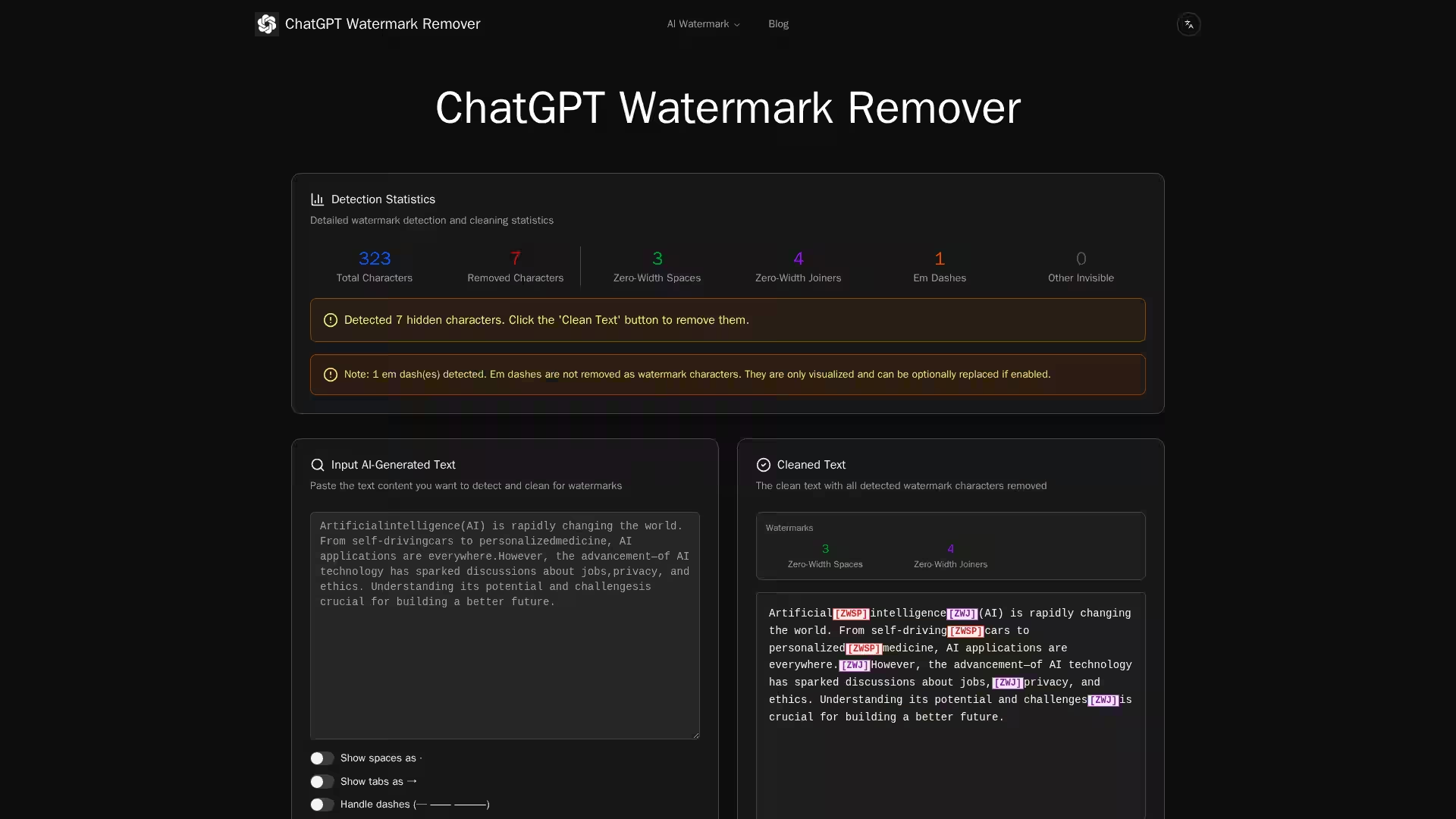
The ChatGPT Watermark Remover is a cutting-edge, free online tool designed to detect and remove hidden watermarks from AI-generated text. As artificial intelligence platforms such as ChatGPT, Claude, and other large language models become more prevalent, text watermarking has emerged as a method for tracking, detecting, and identifying AI-produced content. While invisible characters used by AI systems do not affect the visible appearance of content, they can serve as digital fingerprints.
The ChatGPT Watermark Remover works by scanning your text for specific hidden Unicode characters — such as zero-width spaces, joiners, non-joiners, direction marks, and separators — that are often embedded within AI-generated output for watermarking purposes. Once detected, these markers are removed, leaving you with clean, human-readable text free from stealth identifications.
This tool is ideal for content creators, developers, journalists, researchers, and individuals concerned about AI watermark detection impacting how their text is perceived or processed. The platform is entirely web-based, requiring no downloads, and performs processing instantly in your browser.
Key Features
Advanced AI Watermark Detection
Identifies zero-width and other invisible characters used by AI models for watermarking.
Detects multiple categories of non-printing Unicode characters, including:
Zero Width Space (ZWSP) – invisible marker often inserted inter-word.
Zero Width Joiner (ZWJ) – connects characters, used as hidden watermark.
Zero Width Non-Joiner (ZWNJ) – prevents joining, also usable for fingerprints.
Word Joiner (WJ) – prevents line breaks between words.
Non-Breaking Space (NBSP) – maintains word grouping.
En/Em Spaces (ENSP) – fixed-width spaces for subtle marking.
Ideographic Space (IDSP) – CJK-specific full-width space.
Em Dash (—) – optionally flagged for replacement if used as watermark.
Line Separator (LSEP) – marks boundaries without new paragraphs.
Paragraph Separator (PSEP) – marks explicit paragraph boundaries.
Direction Marks (LRM/RLM) – control text direction invisibly.
Byte Order Mark (BOM) – indicates encoding, sometimes inserted by sources.
Standard Space & Tab Characters – flagged if manipulated for watermarking.
Line Break Characters – identified and managed.
Instant Cleaning
Removes detected watermark characters without altering visible text content.
Optional visualization mode shows where these characters exist in text.
Statistics Dashboard
Displays counts of each invisible character type found in your text.
Shows total characters scanned, removed, and detected.
Provides breakdowns by type for better transparency.
User-Friendly Interface
Simple paste-and-clean workflow.
Visualizes spaces and tabs for easy checking.
Dash handling option for punctuation refinement.
Multi-Language Support
Works across languages including English, CJK scripts, RTL languages like Arabic and Hebrew.
Supports switching interface language.
Privacy-Friendly Processing
Runs entirely client-side in your browser.
No text content is stored or transmitted.
Use Cases
Content Creators & Bloggers
Ensure articles, blog posts, and marketing copy derived from AI drafts have no hidden watermarks.
Developers
Clean up AI-assisted code comments or documentation before publishing.
Journalists & Researchers
Avoid unintended AI detection triggers in published materials.
Maintain neutrality when AI detection systems may label text as machine-generated.
Academic Writers & Students
Remove hidden markers from drafts to ensure originality perception.
Marketing Teams
Produce clean, professional copy without embedded watermarks that could affect brand perception.
International Content Producers
Detect watermarks in multilingual content, especially where scripts and spacing differ.
FAQ
Q: What exactly is an AI watermark?
A: An AI watermark is often an invisible pattern of characters embedded in generated text. They are not visibly different but can be detected by specialized tools, allowing identification of text origin.
Q: Will using this tool change my text visually?
A: No — all removals are of non-printing or invisible characters, so the visible layout and wording remain intact unless optional punctuation replacements are enabled.
Q: Is the tool free?
A: Yes, the ChatGPT Watermark Remover is completely free to use online.
Q: Is my text sent to any server?
A: No — the processing occurs entirely in your browser, ensuring privacy and security.
Q: Why are there so many different types of invisible characters?
A: Unicode provides numerous formatting and control characters for different languages and scripts. AI models may use these for intentional watermarking.
Q: Can this tool remove watermarks from images or PDFs?
A: No — this is a text-based watermark remover. It does not process visual watermarks found in images or non-editable PDFs.
Q: What detection methods does the tool use?
A: The tool scans for specific Unicode codes known to be used in AI watermarking based on research into AI-generated text patterns.
Q: Does removing watermarks violate any terms of service?
A: Depending on the AI service, altering or removing embedded identifiers could violate their terms. Always ensure compliance with relevant agreements.
Conclusion
The ChatGPT Watermark Remover is a highly specialized utility built for a modern challenge: invisible AI watermarks. By leveraging comprehensive Unicode detection and user-friendly cleaning capabilities, it safeguards your content’s presentation and privacy. Whether you work in media, programming, academia, or just value control over your text, this free, browser-based solution offers a simple yet powerful answer to hidden AI text marking.